

Complete your Pre-Arrival Form Online
We’re excited to welcome you for a fishing trip at Eagle Charters! To ensure your experience runs smoothly, please have everyone in your group fill out the pre-arrival form—this will include flight details as well as rain gear and boot sizes. Completing the form ahead of time allows us to better meet your individual needs. Share the provided link with all participants in your party.
Purchase your Fishing License online
Alaska Department of Fish & Game (ADFG) only issues fishing licenses online. Below are step-by-step instructions for purchasing your license before your arrival. If you plan to fish for king salmon, state law requires you to have a king salmon stamp. Should an emergency closure prevent its use, Alaska offers refunds for purchased stamps.
*Remember to keep your printed & signed license with you when boarding the catamaran, our staff will check it during the ride to Elfin Cove.*
Instructions for Purchasing an Alaska Sport Fishing License
Please follow the steps below to purchase your fishing license:
-
Visit https://store.adfg.alaska.gov/ (link below)
-
Select “Shop as Guest” or create an account and sign in.
-
Enter all required information accurately.
-
Click on “Start Shopping.”
-
Select “Fishing, Hunting, Trapping Licenses & Stamps.”
-
Choose “Short Term Fishing Licenses and King Salmon Stamps.”
-
From the drop-down menu, select the appropriate sport fishing license corresponding to the duration of your trip:
-
For a 3-day fishing package, purchase a 3-day fishing license.
-
For a 5-day fishing package, please obtain a 7-day fishing license.
-
For extended trips, select either a 7-day or 14-day fishing license based on your itinerary.
-
-
Ensure that you select the correct start date, which should align with the morning of your first fishing day at 7 AM.
-
Click “Add to Cart.”
-
When prompted by the pop-up window regarding the King Salmon Stamp, select “Yes.”
-
Proceed to checkout.
-
Print a copy of your license, sign it, and bring it with you.
If you run into any trouble, contact Haley at Eaglecharters123@gmail.com—she’ll be glad to assist.
Detailed Instructions with Images
Select “Shop as Guest” or create an account and sign in.

Enter all required information.
Click on “Start Shopping.”

Select “Fishing, Hunting, Trapping Licenses & Stamps.”

Choose “Short Term Fishing Licenses and King Salmon Stamps.”
From the drop-down menu, select the appropriate sport fishing license corresponding to the duration of your trip:
-
For a 3-day fishing package, purchase a 3-day fishing license.
-
For a 5-day fishing package, please obtain a 7-day fishing license.
-
For extended trips, select either a 7-day or 14-day fishing license based on your itinerary.
Ensure that you select the correct start date, which should align with the morning of your first fishing day at 7 AM.
Click “Add to Cart.”


When you click “add to Cart” a pop-up window will appear (as pictured below) this is where you select your king salmon stamp. Select “Yes.” We highly recommend that everyone purchase a king salmon stamp.
In the rare event of an emergency closure, the state will refund you for a king stamp that is no longer usable.
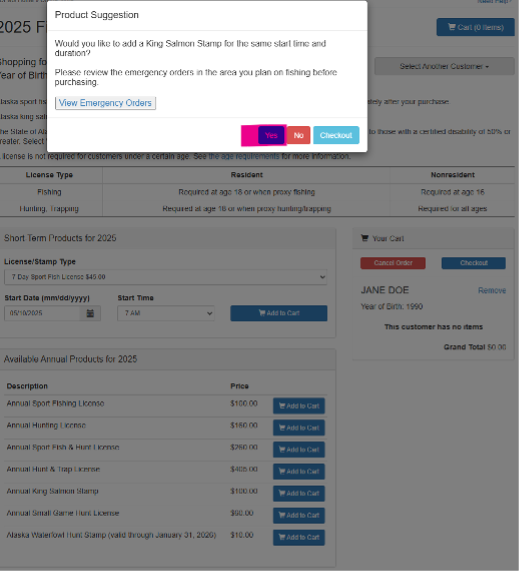
Confirm your sport fishing license and king salmon stamp are “in your cart.”

If you would like to add more licenses prior to checking out click “Select Another Customer” (highlighted in the image below). If you select another customer you will repeat the steps for each additional license.
If you are ready to purchase your license click “Checkout.”

Once you have all the licenses and stamps you wish to purchase in your cart, click “Checkout”

Confirm all the information and licenses are correct and click “Proceed to Checkout”

You will need to enter billing information, email and phone number then check the box and click “save/next”
If you have multiple people you are purchasing licenses for, you will need to add billing information for each, if the information is that same there is a drop down to select “Use previously entered address”

Proceed to payment
